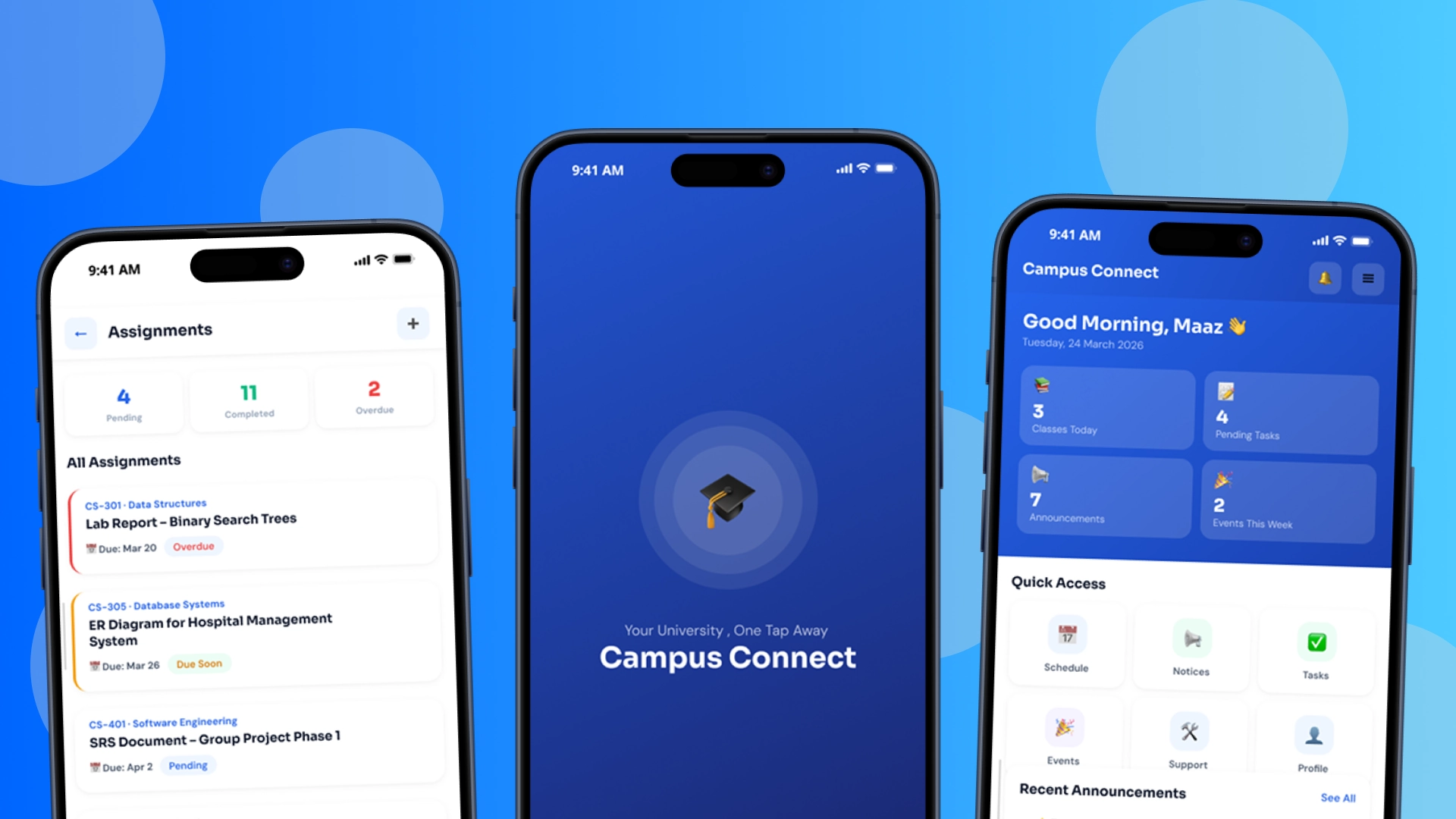
Campus Connect
A university mobile app built in Flutter: schedules, assignments, campus services, and announcements consolidated into one intuitive experience.
Client / Organisation
University Project
My Role
UI/UX Designer & Developer
Timeline
2025 – 2026
Deliverables
10+ screen Flutter app, design system, prototype
The Brief
University students were managing schedules, assignments, announcements, and campus services across five different apps and a group chat. The brief was to consolidate everything into one intuitive mobile experience.
Campus Connect centralises academic life: real-time class schedules with status indicators, an assignment tracker with due-date alerts, a prioritised notice board, campus events with in-app registration, and an academic profile showing CGPA and attendance, all behind a single login.
The Approach
Problem Mapping
Interviewed students about their daily academic workflow and mapped where information lived, and where it got lost.
UX Architecture
Designed the information architecture around at-a-glance answers: a dashboard with live counters and one-tap access to every module.
UI System in Figma
Built a clean blue-and-white component system (status badges, cards, bottom navigation) prototyped and tested before a line of code.
Flutter Build
Implemented all 10+ screens in Flutter/Dart, translating the design system 1:1 into a working application.
The App — Screen by Screen
Every screen in Campus Connect, and what it does for the student holding it.
Splash Screen · 01 / 10
Splash Screen
The first thing every student sees: a bold, clean launch screen that sets the tone for Campus Connect. The university cap icon and tagline 'Your University. One Tap Away' communicate the app's purpose at a glance, making for a confident and welcoming first impression.
Login
A clean, secure entry point using university-issued student credentials. The screen supports login via university email or student ID with a password field, and includes quick links for password recovery and a help prompt, ensuring no student is ever locked out.
Home
The central hub of Campus Connect, a personalised dashboard that greets students by name and surfaces everything they need at a glance. Live counters show today's classes, pending tasks, announcements, and upcoming events. A quick-access grid provides one-tap navigation to every major module in the app.
Schedule
A full day-by-day timetable that adapts to each student's enrolled courses. Each class slot shows the teacher's name, room number, and a real-time status indicator (Completed, Ongoing, or Upcoming) alongside the online or in-person mode. A daily summary shows how many classes remain.
Events
An interactive events showcase listing upcoming campus activities, from tech summits and workshops to cultural nights and sports galas. Each card includes the venue, date, time, category tags, and a direct registration button so students can sign up without leaving the app.
Assignments
A comprehensive task manager that categorises all academic work into Pending, Submitted, and Overdue groups. Each card displays the course code, task title, due date, and a colour-coded badge for instant clarity. Overdue alerts ensure students never miss a deadline.
Announcements
A centralised notice board aggregating important communications from all university departments. Notices are tagged by category (Academic, Events, Admin) and sorted by urgency, with direct links to resources, forms, or registration pages embedded inline.
Academic Events
A focused calendar for academic milestones: mid-term schedules, final exam timetables, project submission deadlines, and faculty-hosted sessions. Helps students plan weeks ahead with clear date, time, and venue information for every critical academic event.
Profile
A detailed academic identity card for every student, covering personal information, university email, department, batch year, and faculty advisor alongside a live academic summary: CGPA, attendance percentage, and total enrolled courses, all in one clean view.
Settings
Full control over the Campus Connect experience. Students can manage notification preferences, toggle display options, update personal preferences, and control account settings, all organised into a clean, scannable panel that puts the student in charge.
screens shipped 1:1 from Figma to Flutter
Outcomes
10+ screens covering the full student workflow: schedule, tasks, notices, events, profile
Design-to-code fidelity: the Figma system shipped 1:1 in Flutter
Defended in a viva examination as a production-grade build
What I Learned
Designing and building the same product teaches you what each discipline forgives, and what it doesn't.
The dashboard is the product: if the first screen answers the day's questions, everything else is depth.